 AnyDoc to Markdown
The problem it solves
AI chat tools and note apps want plain text, not a 40 page PDF. Markdown is plain text with a few simple marks for headings, lists and tables. It stays readable anywhere and it's what most AI tools handle best.
Getting a document into that shape by hand is miserable. Copy and paste out of a PDF gives you broken lines, lost headings and tables turned into soup. This tool does the conversion for you and keeps the structure.
How it works
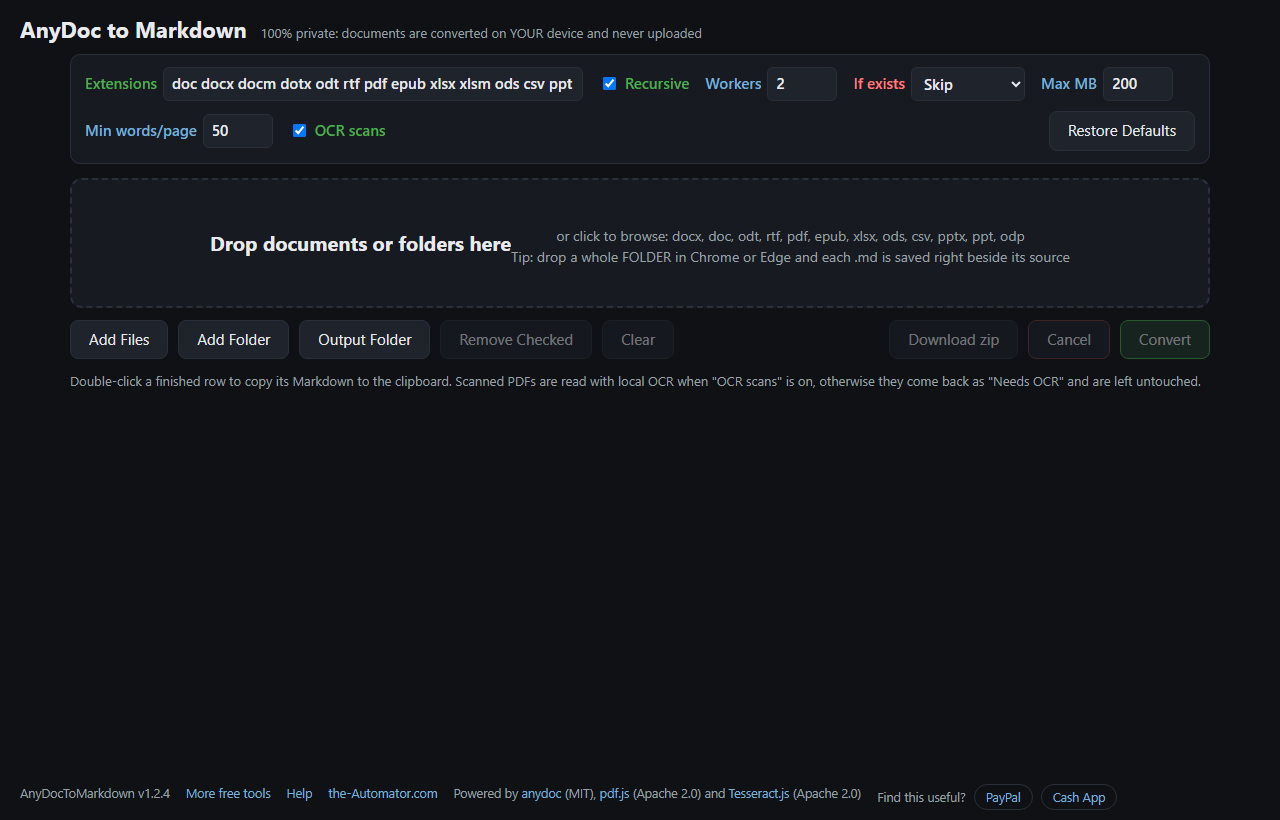
- Drop your documents on the page, or use Add Files or Add Folder. A whole folder works too.
- Check the list. Each file shows its size and type. Uncheck anything you don't want.
- Press Convert. Every row shows its status as it goes: Done, Needs OCR, Skipped or Failed.
- Get your Markdown. Double-click a finished row to copy it, download the results as a zip, or let it save each .md right beside the original.
Scanned PDFs
A scanned PDF is really a stack of photos of pages, so there's no text to copy. With OCR scans turned on, the tool reads those pages with Tesseract, a text-recognition engine that runs right in your browser. It takes a few seconds per page on a desktop and longer on big scans, and it reads English.
Clean, straight scans come out well. Faint copies, handwriting and odd fonts come out rougher. If you'd rather skip OCR, turn it off and scanned files are simply marked Needs OCR and left alone.
Built for a pile of files
I first built this as a desktop tool for my own PC, because I kept feeding documents to AI. This is the browser version, so it works without installing anything.
Drop a folder in Chrome or Edge and each Markdown file is saved right next to its source as Name.ext.md. You decide what happens when one already exists: skip it, overwrite it, or add a timestamp. The Est. Tokens column gives you a rough idea of how much of an AI's context window each file will use.
Why I ask for your email
Not because of your documents. The conversion runs entirely in your browser, so your files are never uploaded and I never see them.
The email lets me know who's using the tool, and I might send you a note now and then about other free tools I build. I will never sell or give your email to anyone else.
Questions people ask
Is it free?
Yes. No account fees, no page limits and no API key.
Are my files uploaded anywhere?
No. The converter runs inside your browser on your own device. Nothing is uploaded and nothing is stored on a server.
Which file types does it take?
DOCX, DOC, ODT, RTF, PDF, EPUB, XLSX, ODS, CSV, PPTX, PPT and ODP.
Is there a size limit?
Files over 200 MB are skipped by default so the browser tab doesn't run out of memory. You can change that in the settings.
Which browser should I use?
Chrome or Edge on a computer gets every feature, including saving beside the source files. Other browsers download the results instead.
Why doesn't the formatting match exactly?
Markdown is deliberately simple, so columns and exact spacing can't carry over. The words, headings, lists and tables do.